A restaurant self ordering kiosk is a customer-facing touchscreen ordering system that allows guests to browse menu items, customize their meals, place orders, and complete payments without assistance from a cashier.
Typically integrated with a restaurant's point-of-sale (POS) system, the kiosk automatically sends orders to the kitchen while synchronizing menu updates, pricing, and inventory in real time.
Unlike traditional counter ordering, a self ordering kiosk gives customers full control over the ordering process.
They can review menu options at their own pace, make modifications, add extras, and pay using various payment methods, including credit cards, mobile wallets, and contactless payments.
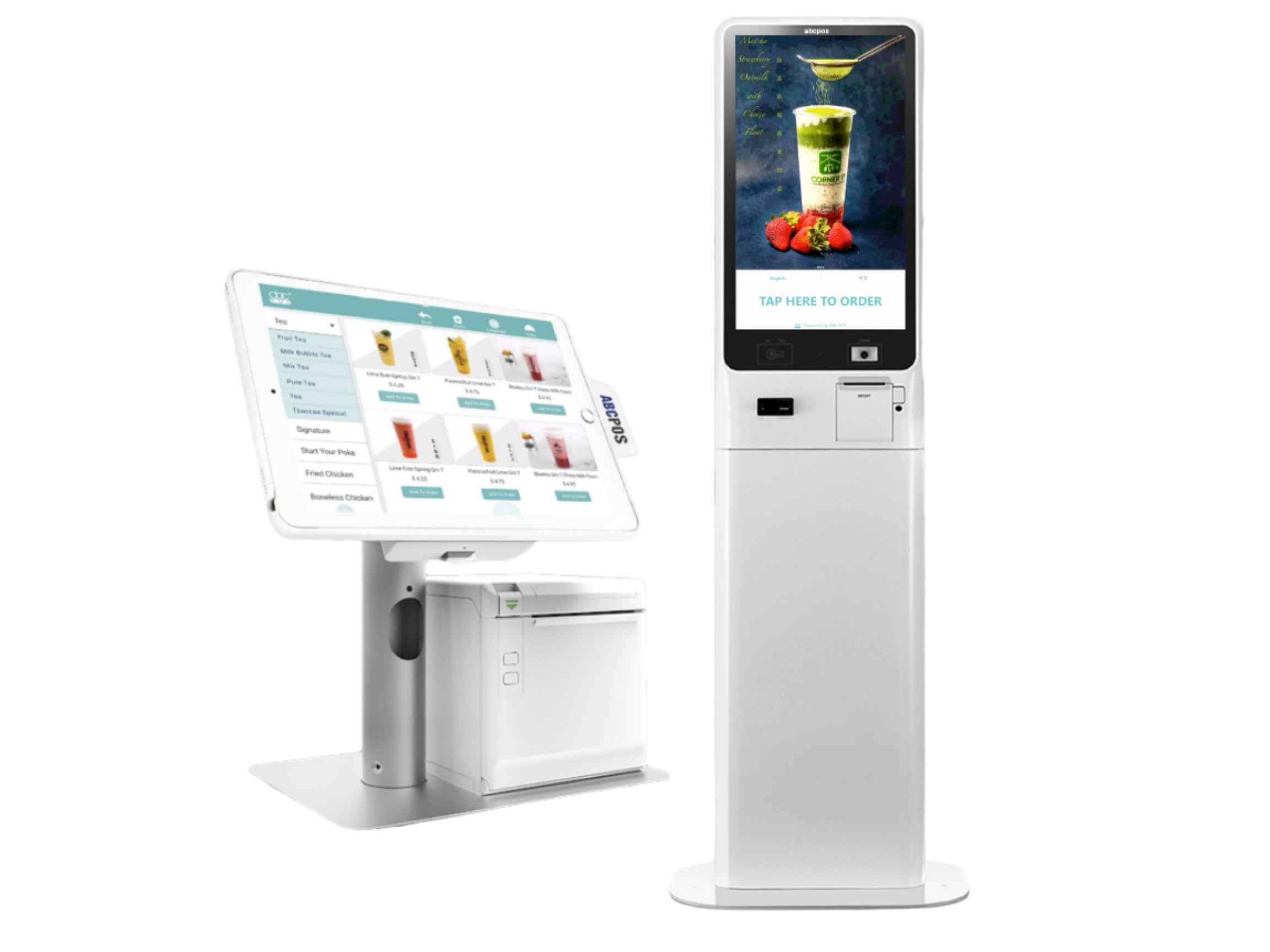
At its core, a kiosk is a point-of-sale terminal that puts the ordering process in the customer's hands.
They walk up, tap through the menu, add modifiers, choose upsells, and pay.
The order goes directly to the kitchen display or printer — no middleman required.
Today modern kiosks connect to your existing POS system and can sync menu changes in real time.
Some are freestanding floor units; others are countertop models for tighter spaces.
The hardware matters less than how well the software is integrated with your operations.
Not every restaurant needs a self ordering kiosk. The value of a kiosk depends on your service model, customer volume, menu complexity, and operational challenges.
In general, self ordering kiosks deliver the greatest benefits in restaurants that handle a high volume of orders and want to improve efficiency, reduce wait times, and enhance the customer experience.
Self ordering kiosks are particularly effective for:
A self ordering kiosk may not be the best investment for:
The size and volume of your restaurant play a major role in determining whether a kiosk is worthwhile. A busy fast casual restaurant serving hundreds of customers per day may achieve ROI relatively quickly through increased order value and operational efficiency. In contrast, a small café with lower daily traffic may require a much longer payback period.
Before investing in a self ordering kiosk, evaluate your customer flow, labor challenges, available space, and long-term growth goals to determine whether the technology aligns with your business needs.
Most operators make the mistake of evaluating kiosks on hardware specs first. The questions that actually matter are:
1. POS integration. Does it sync bidirectionally with your existing system, or does it create a parallel workflow that your staff has to reconcile manually? Integration friction kills adoption on both the staff and customer side.
2. Menu management. Can you update items, prices, and availability from a central dashboard? How long does a menu change take to propagate to the kiosk screen? During a 86'd item situation, that matters.
3. Upsell and modifier logic. How much control do you have over when and how add-ons are presented? Generic upsell prompts ("Add a dessert?") perform worse than contextual ones tied to the specific item ordered.
4. Payment flexibility. Credit, debit, contactless, and digital wallets should all be supported. If a customer can't pay the way they want to, you've just created friction where you were trying to remove it.
5. Support and reliability. A kiosk that goes down during your Friday dinner rush is worse than not having one at all. Ask vendors about uptime guarantees, remote diagnostics, and what the escalation path looks like.
Hardware typically runs $3,000–$7,000 per unit for a commercial-grade freestanding kiosk, though countertop models can come in lower.
Add installation, network setup, and any custom menu programming. Ongoing costs include software licensing (usually monthly SaaS fees ranging from $50–$300/unit depending on features) and payment processing.
The payback period varies widely. A busy fast casual doing significant lunch volume might see ROI within 12–18 months through a combination of labor savings and increased average ticket.
A lower-volume location could be looking at 3+ years. Run your own numbers before committing.
Adoption is highly location and demographic dependent. In fast casual environments, studies consistently show that a majority of customers will use a kiosk once one is available — especially younger diners. Many customers appreciate the control and convenience that a self order kiosk provides, along with the improved customer experience created by shorter lines and easier order customization.
It depends entirely on your POS provider. For Example, abcPOS have native kiosk products or certified third-party integrations. If you're running a legacy system, integration may require middleware or may not be feasible. Verify this before purchasing hardware.
This is a real operational concern. You need a contingency plan — whether that's a tablet backup, reverting to counter ordering, or having a staff member assist at the kiosk while an issue is diagnosed. Ask any vendor how their hardware warranty and remote support work before you sign.
Most systems support free-text special instruction fields and allergy flagging. The quality of this varies significantly between platforms. If dietary accommodation is important to your guests, test this workflow specifically during any demo or trial period.
Sometimes yes, but the math needs to work. If you're seeing consistent bottlenecks at the counter, losing customers to wait times, or struggling to staff peak periods, a kiosk can genuinely help. If your volume is steady and manageable, the upfront cost may not justify itself. Talk to operators in similar formats who've installed kiosks — their real-world experience will tell you more than any vendor pitch.
Fill out the form below to receive:
Product demo videos/live Demo and see pricing


Copyright © 2024
A registered ISO of Wells Fargo Bank, N.A., Concord, CA
Abacus Business Computer


