A restaurant budget should answer four practical questions:
You do not need advanced accounting knowledge to create a first draft.
You need realistic estimates, written quotes, and a spreadsheet that separates startup costs, monthly expenses, sales, and cash flow.
You can download our restaurant budget Excel template and replace the sample fields with your own numbers.
Do not begin by guessing how much the restaurant will cost.
Collect the documents that already contain your most reliable numbers:
If you do not have a confirmed number, mark it as an estimate. Replace it when a written quotation becomes available.
Your final budget should not rely on numbers copied from another restaurant. Rent, wages, permits, construction costs, and insurance vary by location and restaurant type.
Startup costs are paid before opening or during the opening process.
Common startup costs include:

Monthly operating costs begin after the restaurant opens.
These may include:
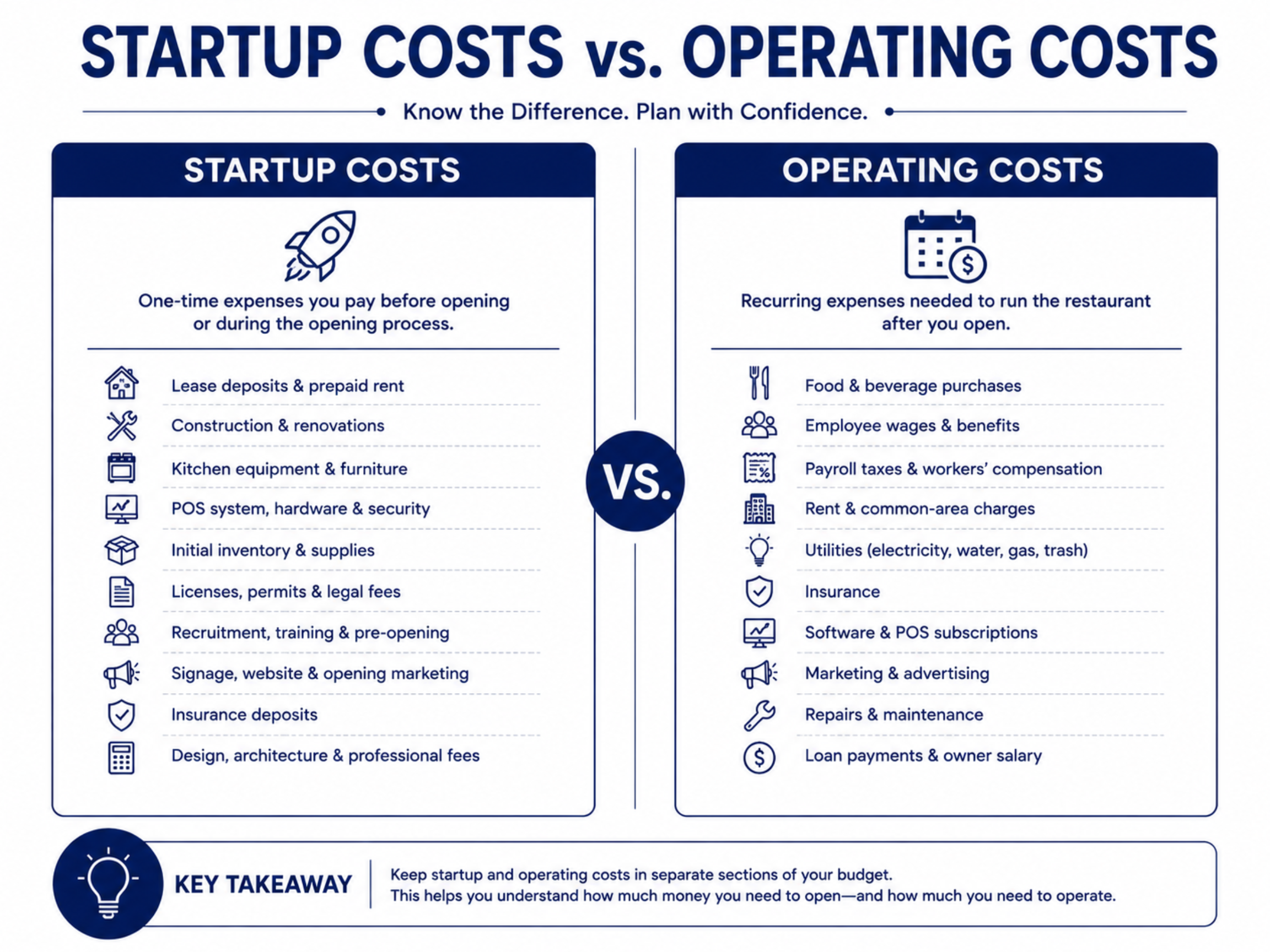
Keep these categories separate in the spreadsheet. Otherwise, you may know the total amount you plan to spend but still not know how much cash is needed before opening.
Opening costs often change because of construction issues, inspection requirements, equipment changes, or delays.
Use this formula:
Contingency Reserve = Estimated Startup Costs × Contingency Percentage
The percentage should be selected with your contractor, accountant, lender, or project manager. Do not choose a number only because it appears in an online article.
For example, when estimated startup costs are $200,000 and the approved contingency is 15%:
$200,000 × 15% = $30,000
The revised startup budget would be $230,000.
This reserve should be kept for unexpected requirements. It should not be treated as money available for décor upgrades or optional equipment.
Do not begin with the amount of revenue you hope to earn.
Start with the number of customers the restaurant can physically serve.
For a dine-in restaurant:
Monthly Guests = Seats × Average Daily Seat Turns × Operating Days
Then calculate:
Monthly Dine-In Sales = Monthly Guests × Average Check
For example:
Estimated monthly guests:
60 × 1.5 × 26 = 2,340
Estimated dine-in sales:
2,340 × $32 = $74,880
This is only an example. Replace every assumption with information from your own concept, menu, location, and operating plan.
Estimate takeout, delivery, catering, private events, and merchandise separately. Do not combine them into dine-in sales unless they are based on the same customer-volume assumptions.

A single sales forecast can create false confidence.
Build three versions:
Use lower traffic, slower growth, and higher operating costs. This shows what happens if opening sales are weaker than expected.
Use the assumptions best supported by your seating capacity, menu prices, location research, and operating schedule.
Use stronger traffic and sales assumptions, but do not exceed the restaurant’s realistic capacity.
Your restaurant should not depend entirely on the optimistic scenario to pay rent, payroll, debt, and supplier bills.
Use this formula:
Food Cost Percentage = Food and Beverage Cost ÷ Food and Beverage Sales
Your expected food cost should come from your recipes, portion sizes, supplier prices, menu pricing, and expected waste.
Do not insert a general industry percentage without checking whether it applies to your concept.
A bakery, sushi restaurant, coffee shop, bar, and full-service restaurant may have very different purchasing and waste patterns.
When possible, track these categories separately:
This makes it easier to identify which part of the menu is missing its cost target.
Labor costs include more than hourly wages.
Your budget may need to include:
For hourly employees:
Monthly Base Wages = Number of Employees × Hourly Rate × Weekly Hours × 4.33
Then add the payroll burden confirmed by your accountant or payroll provider.
Minimum wage, tipped-wage, overtime, sick-leave, and payroll requirements vary by state and city. Verify the rules for the restaurant’s actual location before finalizing this section.
Fixed expenses usually remain due even when sales are lower than expected.
Examples include:
Convert quarterly and annual bills into monthly amounts.
Also include expenses that increase as transactions increase:
Use actual contracts or written pricing whenever possible.
Author requirement: If this article later mentions an abcPOS subscription, processing rate, online-ordering fee, reporting function, or hardware cost, insert only current and verified product information. Do not add estimated features, savings, or pricing.
A basic operating forecast can use:
Operating Profit = Sales − Variable Costs − Labor − Fixed Expenses
This is a planning calculation. Your accountant may handle interest, taxes, depreciation, and other items differently.
To estimate break-even sales:
Contribution Margin Percentage = 1 − Variable Cost Percentage
Break-Even Sales = Fixed and Labor Costs ÷ Contribution Margin Percentage
Break-even sales tell you how much revenue the restaurant needs before its planned operating profit reaches zero.
Recalculate this number whenever rent, labor, food costs, pricing, or processing fees change.

Profit does not always mean cash is available.
A restaurant may show a future profit while still running out of money because deposits, construction payments, inventory, and payroll are due earlier.
For each month, calculate:
Ending Cash = Beginning Cash + Cash Received − Cash Paid
The following month begins with the previous month’s ending cash.
Your cash-flow sheet should include:
If ending cash becomes negative, the restaurant has a funding gap.
Possible responses include reducing startup spending, securing additional funding, delaying optional purchases, renegotiating payment schedules, or adjusting the opening plan.
Do not solve a cash shortfall by increasing the sales estimate without evidence.

Before signing major contracts, test the budget under less favorable conditions.
Change one assumption at a time:
Check the ending cash after each change.
This step shows which assumptions create the greatest financial risk and how much additional funding may be needed.
The downloadable Excel template should include:
Replace all sample values with your own quotations and estimates.
Fill out the form below to receive:
Product demo videos/live Demo and see pricing


Copyright © 2024
A registered ISO of Wells Fargo Bank, N.A., Concord, CA
Abacus Business Computer


